Salesforce connector (src/node_wire_salesforce)
The Salesforce connector provides a secure, asynchronous interface for managing CRM records (Leads and Contacts). It uses Node Wire's OAuth2AuthProvider to refresh tokens automatically, so it fits agentic workflows and medical-to-CRM pipelines.
Capabilities
The connector exposes full CRUD (Create, Read, Update, Delete) operations for the two most common Salesforce objects used in healthcare and enterprise outreach:
| Action | Description |
|---|---|
create_lead |
Create a new Lead record. Requires LastName and Company. |
read_lead |
Fetch a single Lead record by ID. |
update_lead |
Update specific fields on an existing Lead. |
delete_lead |
Remove a Lead record. |
create_contact |
Create a new Contact record. Requires LastName. |
read_contact |
Fetch a single Contact record by ID. |
update_contact |
Update specific fields on an existing Contact. |
delete_contact |
Remove a Contact record. |
Configuration
Add the following to your config/connectors.yaml:
connectors:
  salesforce:
    enabled: true
    exposed_via: ["rest", "grpc", "mcp"]
    auth:
      provider: oauth2
      grant_method: refresh_token
      token_url_secret: SALESFORCE_TOKEN_URL
      client_id_secret: SALESFORCE_CLIENT_ID
      client_secret_secret: SALESFORCE_CLIENT_SECRET
      refresh_token_secret: SALESFORCE_REFRESH_TOKEN
Environment variables
The following secrets must be provided (for example, in .env or via your secret manager):
| Variable | Example |
|---|---|
SALESFORCE_INSTANCE_URL |
https://your-domain.my.salesforce.com |
SALESFORCE_TOKEN_URL |
https://login.salesforce.com/services/oauth2/token |
SALESFORCE_CLIENT_ID |
3MVG9... |
SALESFORCE_CLIENT_SECRET |
A1B2... |
SALESFORCE_REFRESH_TOKEN |
5Aep... |
Example usage
REST API
The following request creates a lead:
curl -X POST http://localhost:8000/connectors/salesforce/create_lead \
  -H "X-API-Key: <your-api-key>" \
  -H "Content-Type: application/json" \
  -d '{
    "LastName": "Doe",
    "Company": "Acme Corp",
    "Email": "john.doe@example.com",
    "Status": "Open - Not Contacted"
  }'
Replace <your-api-key> with your NW_REST_API_KEY.
Agentic (MCP)
If registered via MCP, the agent can call the advertised tool salesforce_create_lead (legacy dotted form salesforce.create_lead still invokes but isn't what tools/list advertises) with the following arguments:
Playground interface
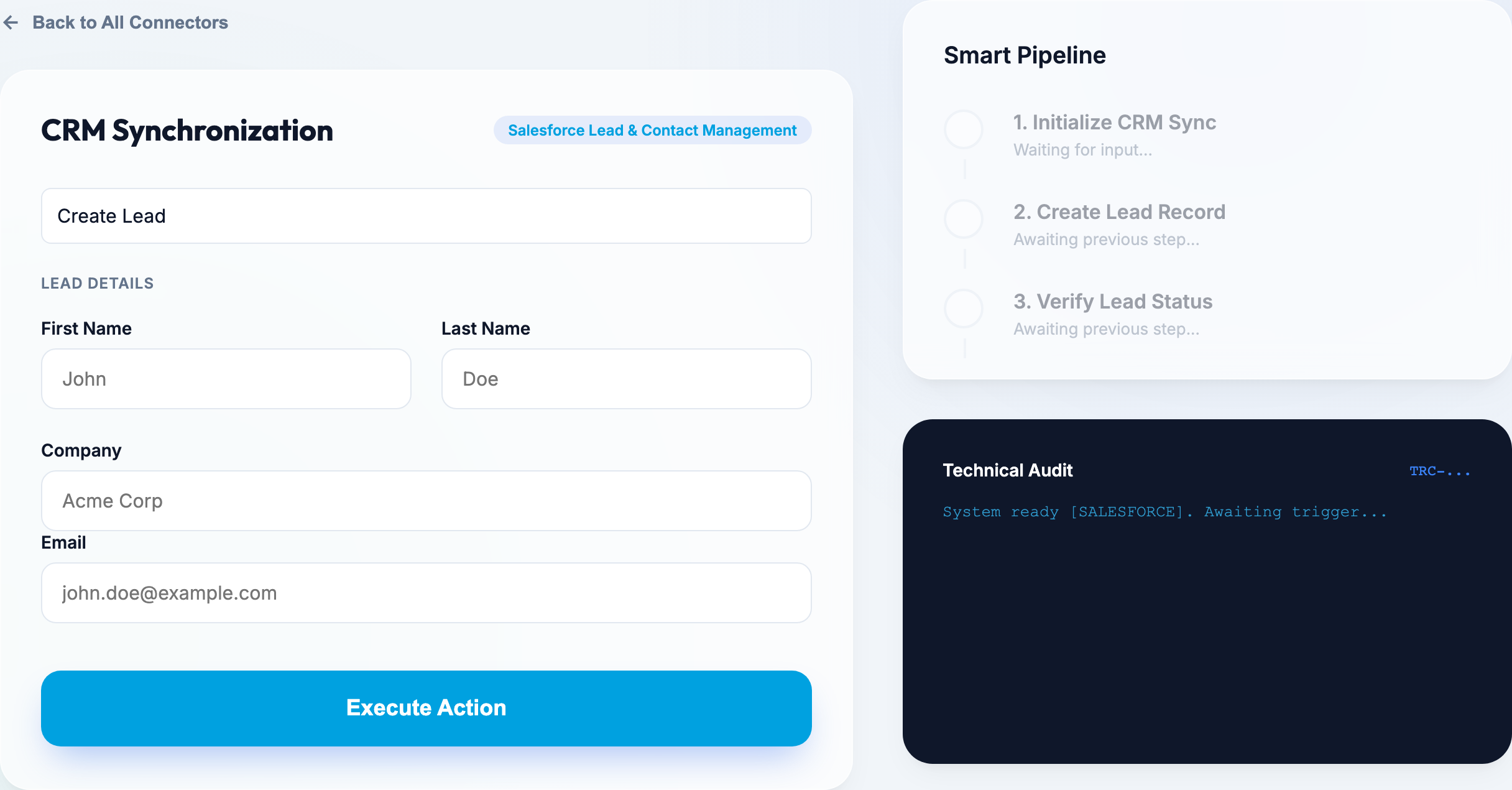
The Node Wire playground includes a CRM Synchronization panel specifically for Salesforce. This interface allows you to:
- Toggle between Lead and Contact management: Use the action dropdown to switch contexts.
- Execute full CRUD operations: The form dynamically adjusts based on whether you are creating, reading, updating, or deleting a record.
- Real-time pipeline visualization: Watch the synchronization steps (Authentication → Fetch/Update → Verification) in real-time.
- Instant record validation: See the exact Salesforce resource IDs and data returned by the API.
Access the playground at http://localhost:8000/playground/ (when running locally), then select Connectors → Salesforce:
Security note
- OAuth2: Tokens are never logged or persisted to disk.
OAuth2AuthProviderholds the resolved access token as a plain in-process value, scoped to the provider instance's lifetime — there is no additional encryption-at-rest or secure-memory mechanism. - Refresh Token Support: The connector is configured to use
grant_method: refresh_token, ensuring it can stay authenticated for long-running agentic tasks. - Traceability: All actions are logged with a
trace_idfor auditing and idempotency tracking. - PII Protection: Ensure your logging levels are set correctly; by default, the connector logs the metadata of the transaction but not the full PII payload.
Related
- Connector reference — catalog: every shipped connector's actions, auth and secrets.
- Use a connector: calling a connector in-process or over REST, per tenant.