CLI
The command-line toolchain that turns an OpenAPI/Swagger spec into a Node Wire connector,
wheels, an MCP host, and a Docker image (nw gen-all for the first three, nw docker-build for the image).
nw is the orchestrator. It calls the other tools for you, so it is the only one most
people need. To generate a connector, wheels and an MCP host from a spec, run:
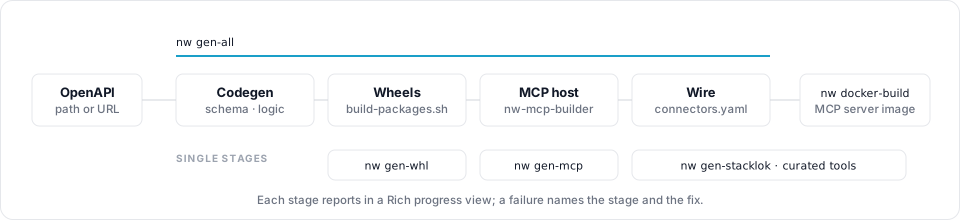
gen-all chains four stages in one process, and each stage is also a command of its own, as the following diagram shows:
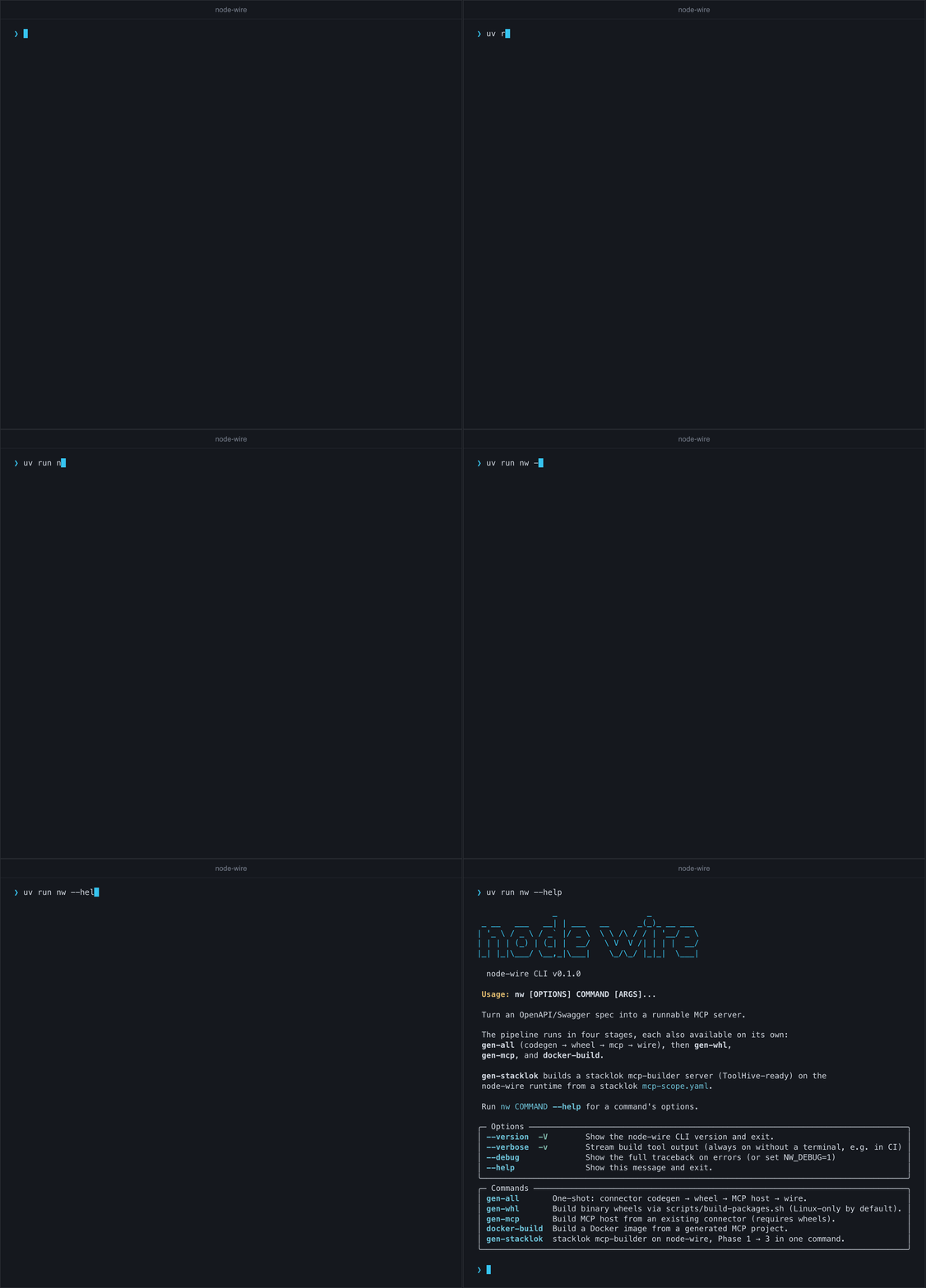
Run uv run nw --help from the repository root to list the commands:
Pages
| Page | What it covers |
|---|---|
| nw CLI | The orchestrator: gen-all, gen-whl, gen-mcp, docker-build, gen-stacklok |
| nw-connector-builder | The OpenAPI → connector generator, run directly |
| Generator contract | What the generator supports, and what it deliberately does not. This is the contract; the how-to is nw-connector-builder |
| Codegen behaviour | Why generated code looks the way it does — read this when output surprises you |
| OpenAPI coverage | Every field of Swagger 2.0 and OpenAPI 3.0–3.2, and how the generator handles it |
| nw-mcp-builder | Turning a connector into a standalone MCP server project, run directly |
Which tool do I use?
| I want to… | Use | Page |
|---|---|---|
| Turn an OpenAPI/Swagger spec into a connector, wheels and MCP host | nw gen-all |
nw CLI |
| Build the Docker image for that MCP host | nw docker-build |
nw CLI |
| Build an MCP server whose tools are curated by AI scoping | nw gen-stacklok |
stacklok MCP servers |
| Regenerate only the MCP host for an existing connector | nw gen-mcp |
nw CLI |
| Rebuild only the wheels | nw gen-whl |
nw CLI |
| Call an existing connector, per tenant | no CLI: ConnectorFactory or the REST API |
Use a connector |
| Write a connector by hand (SDK-style or non-REST) | no CLI: author schema.py + logic.py |
Build a connector |
| Deploy an MCP server to ToolHive and drive it with an agent | no CLI: thv + the bundled agent |
ToolHive scenario |
Advanced / direct access. nw-connector-builder and nw-mcp-builder remain supported as
standalone entry points and expose the full flag surface. Read them when you need a flag nw does
not pass through, or are debugging a single stage.
Related
| Doc | When to read it |
|---|---|
| MCP overview | Transports, tool search, multi-tenancy |
| stacklok MCP servers | nw gen-stacklok in depth |
| Packaging | build-packages.sh, wheels, PyPI |
| Configuration | connectors.yaml and NW_* variables |