nw CLI
nw is the unified CLI for turning an OpenAPI spec into a connector, wheels, an MCP host, and a Docker image. gen-all runs connector → wheel → MCP host → wire; the image is a separate docker-build step. It orchestrates nw-connector-builder, scripts/build-packages.sh, and nw-mcp-builder without replacing those tools.
ToolHive deploy/verify (thv) is out of scope — nw stops at docker-build. To run the image and check it lists its tools, see nw-mcp-builder: Docker. For manual ToolHive registration and the end-to-end agent path, see nw-mcp-builder and toolhive_agent_scenario.md.
Install
nw-cli is part of the monorepo dev dependency group, so the dev install from Installation provides it. Then, from the node-wire repo root (hard assumption — there is no --node-wire-root flag):
Global options go before the command (uv run nw -v gen-all ...):
| Option | Effect |
|---|---|
--verbose / -v |
Stream build tool output (codegen report, build-packages.sh, docker build) line by line. Always on without a terminal, for example, in CI |
--debug |
Print the full traceback with an error (or set NW_DEBUG=1) |
Commands
| Command | What it does |
|---|---|
nw gen-all |
One-shot: connector codegen → wheels → MCP host → wire |
nw gen-whl |
Standalone wheel build via scripts/build-packages.sh |
nw gen-mcp |
Standalone MCP host (requires existing wheels) |
nw docker-build |
docker build inside nw-mcp-builder/out/<server>-mcp/ |
nw gen-stacklok |
Scope an OpenAPI spec with stacklok's /ai-scoping, then build a stacklok MCP server on the node-wire runtime |
nw gen-all
To generate the connector, wheels and MCP host from a spec, run:
The following recording shows a trial run on a copy of the Swagger Petstore spec, with the wheel, MCP host and wire stages skipped:
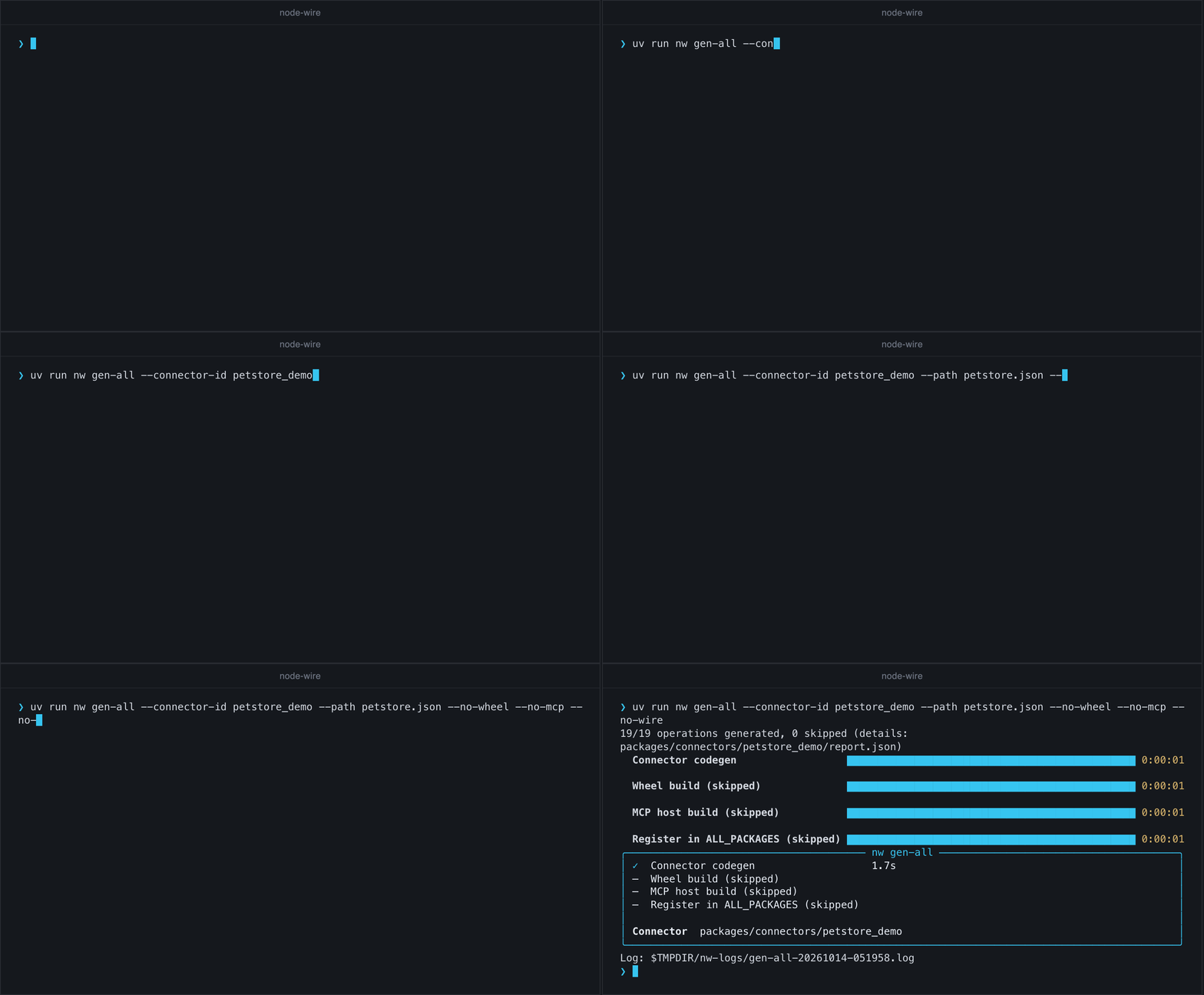
Trial run, or keeping the connector? By default gen-all wires the connector into config/connectors.yaml, sample.env and scripts/build-packages.sh. From then on tests/test_docs_lifecycle.py fails until the connector has a Package inventory row (see When wire is enabled).
- Keeping it: add the inventory row.
- Trial that stops before the MCP host: add
--no-wire --no-mcp. You get the connector and wheels, and nothing is registered. - Trial through
docker-build: keep wiring on. The MCP host is built from the connector'sconfig/connectors.yamlentry, so--no-wirewithout--no-mcpfails at the MCP stage with<id> is not in config/connectors.yaml; wire it in first. When you are done, follow Removing a throwaway connector.
| Flag | Effect |
|---|---|
--connector-id |
Connector id (required) |
--path |
OpenAPI/Swagger file or URL (required) |
--no-wheel |
Skip wheel build; the MCP host bundles the wheels already in dist/ (checked before codegen starts) |
--no-mcp |
Skip MCP host build |
--no-wire |
Skip connectors.yaml / sample.env / ALL_PACKAGES registration. The MCP stage needs the connectors.yaml entry, so combine with --no-mcp unless the connector is already wired |
--force |
Overwrite existing connector / MCP output |
--rebuild-wheels |
Rebuild every wheel, even those whose sources are unchanged |
--base-url |
API base URL when the spec has none, or only a relative one (overrides servers[0]) |
--auth |
For a spec that declares no auth: bearer, header:<name> or query:<name> (GitHub's REST spec needs bearer). Refused when the spec declares a scheme. See auth mapping |
--header |
NAME=VALUE, repeatable: a header the connector sends on every request, such as Twitch's 'Client-Id=${TWITCH_CLIENT_ID}'. ${VAR} is read from the environment at run time. See headers |
--tool-search |
MCP host serves tools through nw_search_tools + nw_call_tool (no prompt) |
--full-tool-list |
MCP host lists every tool, even over budget (no prompt, no warning) |
--max-tool-listing-kb |
Tool listing budget in KB (default 25) |
Checks that need no work run first: the connector id must be a lowercase Python identifier, and with --no-wheel the wheels the MCP host bundles must already exist. Then the stages run in-process and in order, each skippable independently:
flowchart TD
    Start(["nw gen-all"]) --> Preflight{"Pre-flight<br/>valid --connector-id?<br/>--no-wheel: wheels present?"}
    Preflight -- "no" --> Fail(["exit 2 / 1<br/>before any work"])
    Preflight -- "yes" --> Connector["Connector codegen<br/>run_build(no_mcp=True)<br/>+ connectors.yaml / sample.env"]
    Connector --> McpWanted{"Build an<br/>MCP host?"}

    McpWanted -- "yes" --> ToolMode["Decide tool mode<br/>measure listing against --max-tool-listing-kb<br/>TTY: ask · non-TTY: full list + warning"]
    McpWanted -- "no (--no-mcp)" --> WheelGate
    ToolMode --> WheelGate{"Build<br/>wheels?"}

    WheelGate -- "yes" --> Wheel["Wheel build<br/>one build-packages.sh run for runtime, bindings, connector<br/>unchanged sources: reused"]
    WheelGate -- "no (--no-wheel)" --> McpGate
    Wheel --> McpGate{"MCP host<br/>requested?"}

    McpGate -- "yes" --> McpBuild["MCP host build<br/>run_mcp_build"]
    McpGate -- "no (--no-mcp)" --> WireGate
    McpBuild --> WireGate{"Wire the<br/>connector in?"}

    WireGate -- "yes" --> Wire["Register in ALL_PACKAGES"]
    WireGate -- "no (--no-wire)" --> Done(["Done"])
    Wire --> Done

    classDef stage fill:#ddf1fb,stroke:#1a88b0,stroke-width:1px,color:#0d2f3d
    classDef gate fill:#fdf2d6,stroke:#b8860b,stroke-width:1px,color:#3a2c05
    classDef term fill:#eceff3,stroke:#5b7387,stroke-width:1px,color:#1c2733
    classDef bad fill:#fde2ea,stroke:#b81548,stroke-width:1px,color:#3d0a1d
    class Connector,ToolMode,Wheel,McpBuild,Wire stage
    class Preflight,McpWanted,WheelGate,McpGate,WireGate gate
    class Start,Done term
    class Fail bad
Stages are in-process function calls (never re-invokes nw). Connector codegen always passes no_mcp=True to run_build so the builder’s host-only MCP hand-off is skipped; MCP uses skip_build_wheels=True against wheels from build-packages.sh.
When wire is enabled
run_build(..., wire=True)updatesconfig/connectors.yamlandsample.envnwinsertspackages/connectors/<id>intoscripts/build-packages.sh’sALL_PACKAGESlist if missing- Keeping the connector? Add its row to the Package inventory in
docs/packaging.md. The first cell is theproject.namefrom itspyproject.tomlin backticks, for example:| `node-wire-<id-dashed>` | `src/node_wire_<id>/` | `<id>` |(<id-dashed>is defined in the next paragraph).tests/test_docs_lifecycle.pyfails until that table's names matchALL_PACKAGESexactly. For a throwaway connector, revert the three wire edits once you are done (or pass--no-wire --no-mcpup front if you don't need the MCP host). Undo only whatgen-allchanged (git diff config/connectors.yaml sample.env scripts/build-packages.shshows it): delete the added<id>:block, theALL_PACKAGESline and the<ID>_*secret lines with their comment, and remove,<id>from the existingNW_ALLOWED_CONNECTORSline. Don'tgit checkoutthe whole file, which also discards any other uncommitted edits in it.
Where the outputs land. After a successful run (exit 0, every stage ✓ in the summary panel), check these paths. <id-dashed> is the connector id with _ replaced by - (pet_store → pet-store).
| Output | Path |
|---|---|
| Connector source | src/node_wire_<id>/ (logic.py, schema.py, README.md) |
| Connector package | packages/connectors/<id>/ (pyproject.toml, setup.py, tests/, report.json) |
| Wheels | packages/connectors/<id>/dist/node_wire_<id>-*.whl, plus packages/runtime/dist/ and packages/bindings/dist/ (Linux by default) |
| MCP scope fixture | nw-mcp-builder/fixtures/<id>_nw.yaml |
| MCP host | nw-mcp-builder/out/<id-dashed>-nw-mcp/ (layout: nw-mcp-builder: Generated project layout) |
| Wire edits | config/connectors.yaml (new <id>: entry), sample.env (id added to NW_ALLOWED_CONNECTORS, plus the connector's secret names), scripts/build-packages.sh (ALL_PACKAGES line) |
--no-wheel, --no-mcp and --no-wire skip the matching rows.
Removing a throwaway connector
Revert the wire edits as in the preceding list, then delete the generated paths: src/node_wire_<id>/ (and src/node_wire_<id>.egg-info/ if present), packages/connectors/<id>/, nw-mcp-builder/fixtures/<id>_nw.yaml and nw-mcp-builder/out/<id-dashed>-nw-mcp/. Leave packages/runtime/dist/ and packages/bindings/dist/ alone; other connectors reuse those wheels. If you ran nw docker-build, also remove the image: docker rmi <id-dashed>-nw-mcp:latest.
Wheel reuse. Each wheel build stamps the package's dist/ with a hash of its sources (.nw-source-py3-none-any.sha256). The next gen-all rebuilds only the packages whose sources changed or whose stamped wheels are gone, all in one build-packages.sh run; --rebuild-wheels rebuilds everything.
Tool mode. Right after codegen (before the wheel builds), the connector's MCP tool listing is measured. Over the budget (--max-tool-listing-kb, default 25 KB) the progress bars pause and you are asked how the MCP host should expose its tools — the full tool list, or tool search (nw_search_tools + nw_call_tool, schemas on demand) — with an explanation of where tool search can fail. Without a terminal the full list is generated and a warning names the flags. --tool-search / --full-tool-list decide up front. The build never fails on size; the choice becomes the host's default NW_MCP_TOOL_MODE. Wording and logic live in nw-mcp-builder (nw_mcp_builder/tool_listing.py); see its README.
nw gen-whl
The following commands show each build mode:
uv run nw gen-whl --connector-id pet_store   # one connector
uv run nw gen-whl --runtime                  # packages/runtime only
Runs scripts/build-packages.sh for the selected packages. Each gets one pure-Python (py3-none-any) wheel that every image and platform can install, so there is no platform mode and no Docker requirement. Runtime is not rebuilt with every connector build — use --runtime when needed. --connector-id is required unless --runtime and/or --bindings is set. Flags combine into one build run (--runtime --bindings --connector-id pet_store builds all three). gen-whl always builds; it also writes the source stamps gen-all reuses. --bindings builds packages/bindings (the MCP host surface) — gen-mcp asks you to run nw gen-whl --bindings when that wheel is missing.
nw gen-mcp
The following commands regenerate the MCP host for an existing connector:
uv run nw gen-mcp --connector-id pet_store
uv run nw gen-mcp --connector-id pet_store --force-output
uv run nw gen-mcp --connector-id pet_store --tool-search
Takes the same --tool-search / --full-tool-list / --max-tool-listing-kb flags as gen-all, and asks the same question before building the host.
Always skip_build_wheels=True. If any of the runtime, bindings or connector wheels is missing:
- Interactive (TTY): one prompt names every missing wheel and builds them in one run
- Non-interactive: exits non-zero with the exact fix command (for example,
nw gen-whl --runtime --bindings)
There is no --yes / auto-confirm flag.
nw docker-build
The following commands build an image by connector id, with a tag, or by project path:
uv run nw docker-build --connector-id pet_store
uv run nw docker-build --connector-id pet_store --tag v1
uv run nw docker-build --project nw-stacklok-builder/out/petstore-mcp   # a gen-stacklok server
--connector-id finds the projects generated for that connector: the gen-all / gen-mcp host (nw-mcp-builder/out/<id-dashed>-nw-mcp/, image <id-dashed>-nw-mcp:<tag>, with _ in the id replaced by -) and any gen-stacklok server in nw-stacklok-builder/out/ whose config/connectors.yaml lists it (image named after its folder, for example, petstore-mcp:<tag>). With several, a terminal gets an arrow-key menu (newest first); without one the newest is built, with a warning naming it. --project <dir> builds a project by path instead, for one written outside those folders (gen-stacklok --output-dir).
Builds docker build -t <hyphenated-id>-nw-mcp:<tag> . inside nw-mcp-builder/out/<hyphenated-id>-nw-mcp/ (for example, pet_store → image pet-store-nw-mcp:latest, project dir …/out/pet-store-nw-mcp/). --tag defaults to latest. Pass secrets at run time (docker run --env-file / -e); they are not baked into the image. To run the image and verify it, follow nw-mcp-builder: Docker — the container needs NW_MCP_HOST=0.0.0.0 to be reachable.
If the MCP project directory is missing, one TTY / non-TTY prompt offers to generate it first (with any missing wheels), then builds the image; without a terminal it exits with nw gen-mcp --connector-id <id> as the fix. Docker must be running: nw checks before building.
nw gen-stacklok
The following commands scope a spec, build from a reviewed scope, and rebuild with options:
uv run nw gen-stacklok --path <spec path or URL> --connector-id pet_store \
  [--workflow "..." ...] [--auth-hint "..."] [--scoping-notes "..."]
uv run nw gen-stacklok --scope mcp-scope.yaml --connector-id pet_store      # reviewed scope → Phase 3
uv run nw gen-stacklok --scope mcp-scope.yaml --force --no-wheel --no-lock --output-dir out/
--auth and --header work as in gen-all. With --path, --auth is also
declared in the prepared spec, so the AI scoping sees the same auth, and both are remembered with
it: a later --scope run builds the same connector without repeating them (flags given then win).
The printed docker run passes each ${VAR} a header reads (-e TWITCH_CLIENT_ID=<…>).
With --path it runs stacklok's Phases 1–3 in one go:
- prepares the spec;
- opens Claude Code with the
/ai-scopingskill, which asks its questions and stops at its approval gates as in stacklok's flow.--workflow,--auth-hintand--scoping-notesare starting answers. Exit the session to continue.--headless, or no terminal, runs it unattended withclaude -p; - pauses for the human review with a short summary: server, tool count and names, auth,
stacklok's validation result, how many points the AI flagged in
scoping-summary.md, and the project it will write (and whether that replaces an existing one). Pick the next step with the arrow keys and Enter (or an option's first letter): - Generate the MCP server (only offered when the scope passes validation),
- Show details: the tools with their endpoints, and every flagged point,
- Edit the scope (in
$VISUAL/$EDITOR, or your own editor), then review it again, - Redo the AI scoping, with feedback passed to the AI (the previous scope is kept if the rerun fails),
- Stop here, printing the
--scopecommand to resume with.
With output piped the menu takes a typed letter instead; with no terminal at all it stops here; 4. generates.
A second --path run reuses the scope in nw-stacklok-builder/scoping/<id>/ (the review says so,
with its date; r or --rescope redoes it). The connector is always rebuilt from the spec. With
--scope, the scope is validated before anything is built, and you're asked whether to replace an
existing output project; --force replaces it without asking.
Builds a stacklok mcp-builder server on the node-wire
runtime from a stacklok mcp-scope.yaml: connector codegen from the scope's spec.source →
the image's wheels (the same pure-Python wheels gen-whl builds; unchanged packages are
reused) → the vendored stacklok
generator (nw-stacklok-builder/out/<server>-mcp/, then uv lock). --connector-id may be
omitted when the scope has a runtime: {type: node_wire, connector_id: ...} block. See
stacklok MCP servers.
Output
Every command shows the same brand-colored rich.progress display (amber spinner, blue bar, pink on failure), then a bordered summary panel: each stage with ✓ / ✗ / – (skipped) and its duration, and the results (connector, MCP host, image). Commands to run next are printed after the panel so they copy cleanly.
- On a terminal: build tool output is kept out of the way. The running stage shows its latest line under the bars;
nw's own messages (tool mode, reused wheels, operation counts) always print. - With
--verbose, or without a terminal (CI): build tool output streams line by line alongside the bars. - Every run writes a full, timestamped log to
<tmp>/nw-logs/<command>-<time>.log, printed asLog:under the panel. - On failure the panel names the stage and the reason, the last 15 lines of that stage's output (when they were not streamed), and a fix hint. The error is reported once; there is no traceback unless you pass
--debug. An unexpected internal error is labelled as such, with a pointer to--debug.
Ctrl-C stops the running build tool (no orphaned docker or build processes) and exits 130.
Exit codes
| Code | Meaning |
|---|---|
0 |
Success |
1 |
Stage failure, missing prerequisite (Docker, wheels; non-interactive or declined), root resolution error, or an unexpected internal error |
2 |
Usage error: conflicting or missing flags (for example, --tool-search with --full-tool-list), an invalid --connector-id, or a codegen refusal such as an existing connector without --force |
130 |
Interrupted (Ctrl-C) |
Relationship to sibling CLIs
| Tool | Role |
|---|---|
nw |
Orchestrator for the happy path |
nw-connector-builder |
Still available for low-level OpenAPI codegen |
nw-mcp-builder |
Still available for MCP-only generation |
nw-stacklok-builder |
Vendored stacklok generator driven by nw gen-stacklok. Ships stacklok's mcp-builder (analyze / validate / generate) and mcp-builder-schema, which the ai-scoping skill calls; you rarely run them yourself |
Deprecating the standalone builder entry points is not part of this CLI.
Tests
To run the CLI's tests:
Coverage is unit/mocked only (no live Docker or network spec fetch).
Related docs
| Doc | When to read it |
|---|---|
| nw-connector-builder | OpenAPI → connector codegen details |
| nw-mcp-builder | Generated MCP host layout, ToolHive, Inspector |
| Packaging | build-packages.sh, wheels, PyPI |
| Configuration | connectors.yaml and env vars |